So I’ve been testing Microsoft’s Global Secure Access (GSA) lately. It’s supposed to be this modern VPN replacement with Zero Trust and all that fancy stuff. Microsoft is pushing companies to ditch their old VPNs and move to GSA instead. Sounds great, right? Well… I found something that made me raise an eyebrow. Let me show you what happened when I tried to mess with DNS while GSA was supposedly “protecting” my connection.
First, let’s talk about privacy
When I connected GSA and started capturing network traffic, I noticed something interesting. Check out what I saw:
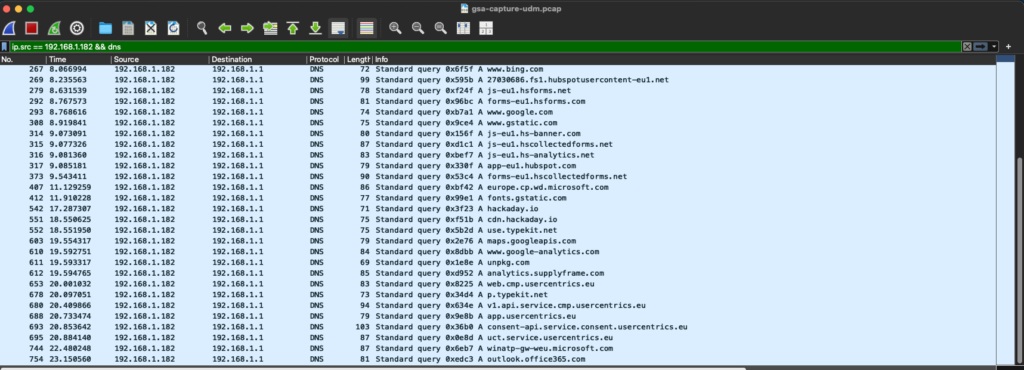
See all those DNS requests? google.com, www.bing.com, outlook.office365.com… yeah, those are all MY DNS queries. In cleartext. Just sitting there on the network for anyone to see.
That’s… not ideal.
Just to make sure I wasn’t crazy, I did the same thing with a “real” VPN:

Zero DNS requests visible. The VPN actually protects them.
Now look, I get it. GSA isn’t trying to be a traditional VPN. And this is technically expected behavior – GSA intercepts DNS responses, not queries.
But here’s the thing: If Entra Internet Access is supposed to protect me wherever I go in the world, shouldn’t it also protect me on public WiFi? Because right now, anyone on that coffee shop network knows exactly what websites I’m visiting.
You might be thinking: “Okay, privacy issue, sure. But that’s not really a security problem, right?”
And honestly? If it was JUST the privacy thing, I probably wouldn’t bother writing this article.
But then I started wondering… if those DNS queries are leaking before GSA can protect them, what happens if someone “lies” to my client?
Well, lets see.
So I decided to try something
I set up a rogue DNS server on my Raspberry Pi.
Nothing fancy, just dnsmasq with a simple config override.
In ‘/etc/dnsmasq.conf,’ I added this:
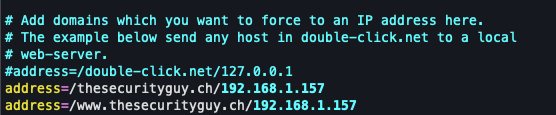
Translation: “Hey, when someone asks for thesecurityguy.ch, tell them it’s at 192.168.1.157 (my Raspberry Pi).”
Now, in a real attack, you’d need to trick the victim into using your DNS server. There are a couple ways to do this:
- DHCP Starvation: Basically exhaust the real DHCP server’s IP pool, then start your own rogue DHCP that points people to your DNS. Here’s a good explanation.
- ARP Spoofing: Make the victim think you’re the gateway, intercept everything. Wikipedia has the details.
Both can be prevented if the network admin knows what they’re doing (DHCP snooping, dynamic ARP inspection, etc.).
But let’s be honest: How many public WiFi networks do you think actually have those configured? This is exactly why people tell you to use a VPN at Starbucks!
For my test, I just manually pointed my client to my rogue DNS server.
Alright, moment of truth. GSA is connected and running. Let me check what IP I get for my website:
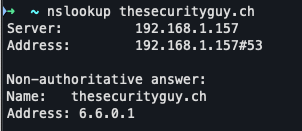
Huh! GSA still gives me that synthetic 6.6.x.x IP. So far so good, GSA is doing its job.
But what happens when I actually try to visit the site in my browser?
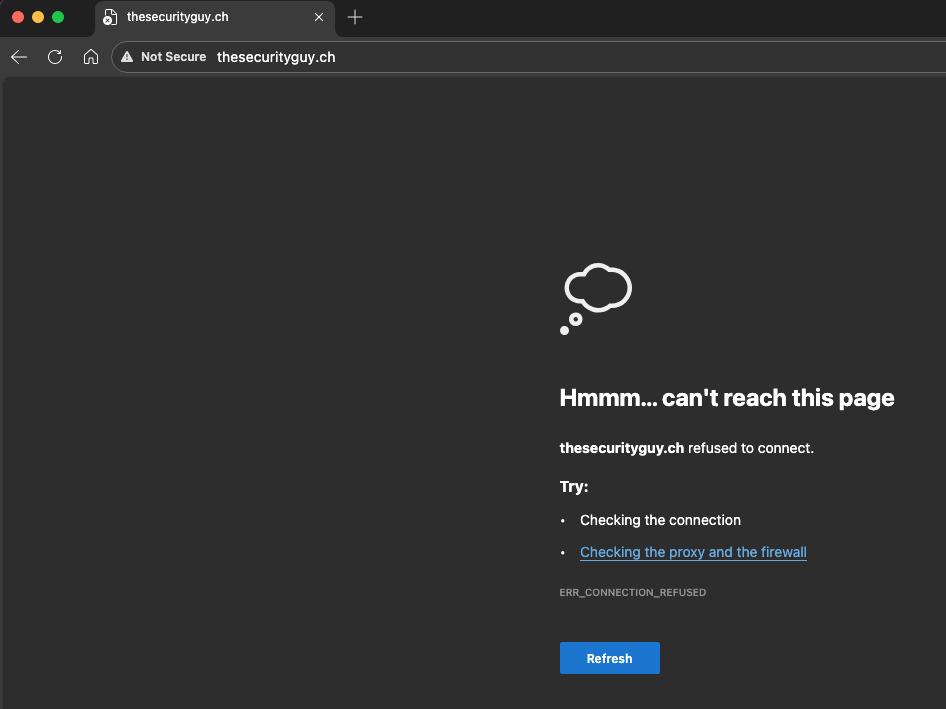
Oh. Oh no.
So i set up Apache2 on my Raspberry Pi and tested again:
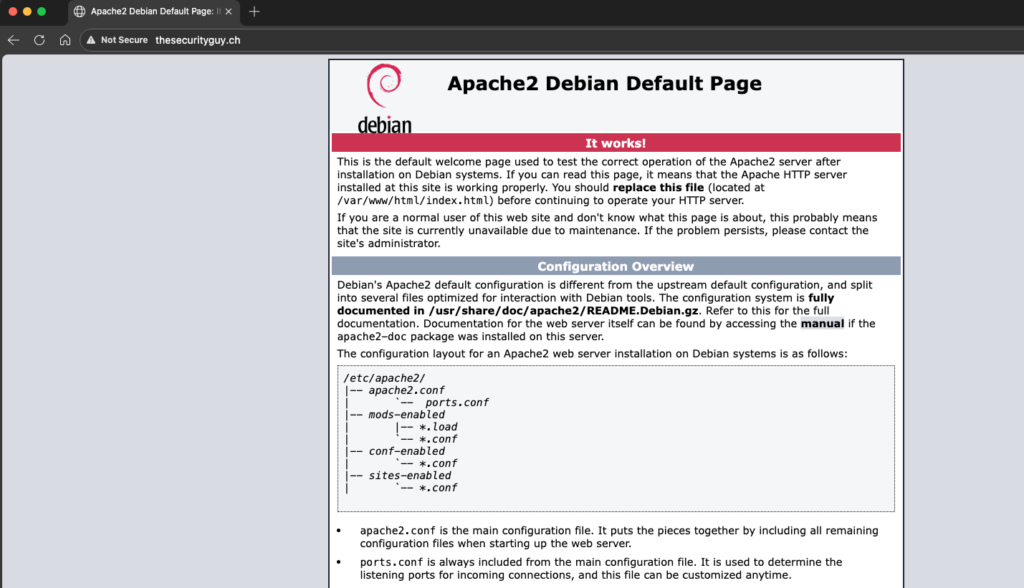
That’s… that’s my Raspberry Pi’s Apache test page. Not my actual website.
This is bad.
And then it got worse
Okay, so I can redirect someone to my own server. But can I redirect them to a completely different website?
I set up a quick redirect in Apache:
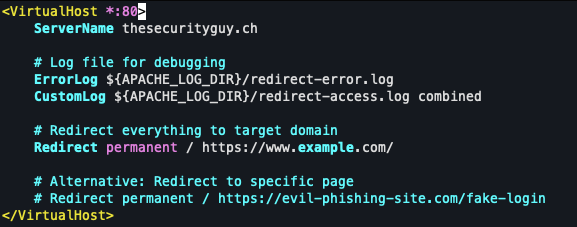
Tried it.
It worked.
So let me get this straight: Even though GSA is “connected” and “protecting” my traffic, I can redirect users to ANY site I want just by controlling their DNS responses.
Does not look good to me! Now, I had to test one more thing. Could I do this to Microsoft’s own login page? I tried the same attack on ‘login.microsoftonline.com’.
Good news: That one didn’t work. Microsoft seems to have extra protections on their authentication endpoints.
Bad news: Pretty much everything else is fair game.
Think about what this means:
- Redirect to phishing sites
- Capture credentials
- MITM attacks
- All while GSA shows “Connected ✓”
And the user has no idea anything is wrong.
And I know: HTTPS and HSTS helps a lot with these kinds of issues. But again: do we wan’t to rely on that alone?
Studies have shown that a lot of users click through the warning messages that show up if a website just uses HTTP or if the SSL Certificate is not valid.
So can you actually protect against this?
The big question remains: can I protect my GSA Setup agains this?
The obvious first thought would be to configure DNS over HTTPS.
But if you look at the Known Limitations page for GSA, they explicitly state that this is not supported:
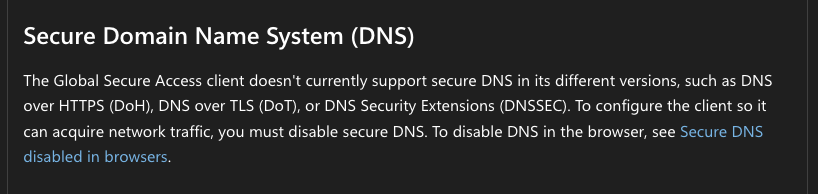
It probably makes sense that this is not supported because GSA has to be able to intercept DNS traffic.
But I was also not able to find an option to send all DNS traffic through GSA without fiddling around with some funky scripts or something.
One exception: If you’re using GSA Private Access for internal resources, you can configure Private DNS suffixes (like `.company.internal`) which will tunnel those specific DNS queries through GSA. But this doesn’t help with public domains like the ones I tested.
So, to be honest: I didn’t find a proper way to mitigate this for general internet browsing. Hopefully there will be a possibility to set custom DNS servers in the future that are tunneled through GSA.
The main question that I ask myself
Why isn’t Microsoft just using their own DNS servers through the GSA tunnel?
Seriously! If I’m connected to GSA, why are my DNS queries going to the local network’s DNS server at all? Why not route them through Microsoft’s infrastructure where they’d actually be protected?
I really don’t understand this design decision.
What I think about all this
I want to be clear: I’m not saying GSA is garbage or Microsoft doesn’t know what they’re doing.
GSA has some really cool features for Zero Trust access and identity-based security that I actually like a lot. And all in all I find it a really nice product.
But here’s what I am saying: GSA is not a drop-in replacement for a VPN in every scenario.
If you had a split-tunnel VPN that was poorly configured, yeah, GSA might be better. But if you had a solid full-tunnel VPN and your network security requirements are really high?
You should probably think twice before getting rid of it.
And honestly, the thing that bugs me most isn’t even the technical limitation. It’s that Microsoft is marketing this as a VPN replacement without being super clear about what’s NOT protected.
Companies are going to make decisions based on “Microsoft says we can replace our VPN” without understanding that DNS is sitting there in cleartext on the network, vulnerable to attacks that VPNs have been protecting against for decades.
That doesn’t sit right with me.
And while we have of course a lot of other security measures baked into HTTPS that could prevents attacks like this, we still have users that would click through every security warning from the browser.
GSA could have been an option to protect our users a lot better against these types of attacks, but unfortunately it isn’t.
What do you think? Am I missing something?
Note: I did all this testing on my own equipment. I’m not out there attacking random people on public WiFi. Don’t be that person.